


Ford BlueCruise Hands-Free Driving: Features & Supported Highways
Picture yourself cruising down a Georgia highway with your hands resting in your lap while your Ford manages steering and lane position. That’s what Ford BlueCruise delivers on select Ford and Lincoln vehicles. If you’d like to experience it before committing, we invite you to schedule a BlueCruise demonstration at Stivers Ford South Fayetteville. Read on to understand exactly how it works, where it operates, and what to expect behind the wheel.
What Is Ford BlueCruise and How Does Hands-Free Driving Work?
Ford BlueCruise is a Level 2 driver-assistance system that enables hands-free highway driving on designated roads called Blue Zones. Ford built it to reduce the physical demands of long highway stretches without removing you from the equation. You remain the driver; BlueCruise supports you.
On a qualified Blue Zone highway, BlueCruise takes over steering, acceleration, and braking together. You can let go of the wheel while the vehicle maintains lane position, matches traffic speed, and holds a safe following distance.
The Technology Behind BlueCruise
BlueCruise relies on radar and forward-facing cameras combined with GPS mapping to read the road in real time. Radar tracks vehicles ahead and behind; cameras interpret lane markings and surrounding traffic; GPS cross-references your location against Ford’s prequalified Blue Zone map. Speed Sign Recognition is also built in. When you pass a new limit sign, BlueCruise reads it and adjusts your set speed automatically.
Driver Attention Monitoring
Your hands can leave the wheel, but your eyes need to stay on the road. A driver-facing infrared camera monitors your gaze direction and head position continuously while BlueCruise is active. If it detects inattention, it issues escalating visual and audio alerts. Stay unresponsive, and BlueCruise gradually slows the vehicle and disengages. Ford designed BlueCruise around attentive drivers, not as a replacement for them.
Where Can You Use BlueCruise? Understanding Blue Zone Highways
BlueCruise operates only on controlled-access divided highways that Ford has prequalified and mapped. These Blue Zones currently cover over 130,000 miles of North American roads.
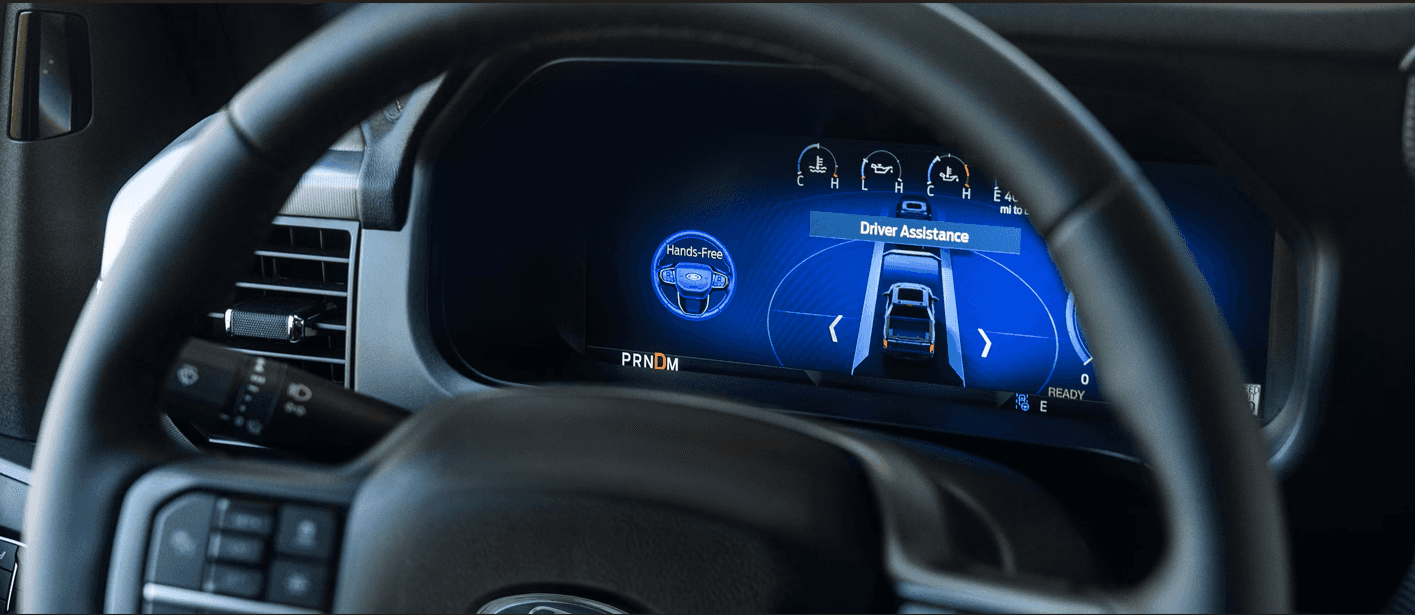
Blue Zones are selected based on reliable lane markings, median dividers, and limited access points. Intersections, roundabouts, construction zones, and city streets are excluded. When you enter a Blue Zone, a blue steering wheel icon and banner message appear on your instrument cluster confirming that BlueCruise is available.
Blue Zone Coverage for Georgia Drivers
Georgia drivers have access to major interstate corridors within the Blue Zone network, which makes BlueCruise practical for both daily highway commutes and longer road trips. Before your drive, you can confirm coverage for specific routes using Ford’s interactive Blue Zone map at ford.com. The network continues to expand, so it’s worth checking periodically for roads you use frequently.
Which Ford Vehicles Support BlueCruise?
BlueCruise is available across several Ford models. The table below summarizes confirmed compatible vehicles based on Ford’s published information. For questions about a specific model year or trim, confirm details with our team directly.
| Vehicle Model | BlueCruise Version | Key Feature(s) | Drive Type | Powertrain | Notes |
| F-150 (2025+) | BlueCruise 1.4 | Lane Change Assist, In-Lane Repositioning | RWD/4WD | Gas/Hybrid | Available on XLT, LARIAT, King Ranch, Platinum, TREMOR |
| F-150 Lightning (2025+) | BlueCruise 1.4 | Lane Change Assist, In-Lane Repositioning | AWD | Electric | Available on FLASH™, LARIAT, Platinum |
| Expedition (2025+) | BlueCruise 1.4 | Lane Change Assist, In-Lane Repositioning | RWD/4WD | Gas | Available on Platinum, King Ranch, Active, and Tremor (with options added) |
| Mustang Mach-E (2026) | BlueCruise 1.5+ | Automatic Lane Change, In-Lane Repositioning | AWD/RWD | Electric | 1.5+ adds Automatic Lane Change |
| Explorer (2026) | BlueCruise 1.5+ | Automatic Lane Change, In-Lane Repositioning | AWD/RWD | Gas/Hybrid | Available on ST-Line, ST, Platinum, Tremor |
Key Ford BlueCruise Features That Make Highway Driving Easier
Hands-Free Steering, Speed, and Lane Control
BlueCruise keeps you centered in your lane, maintains your selected speed, and adjusts following distance based on the vehicle ahead. Lane-centering technology uses camera input to make continuous small steering corrections, while Adaptive Cruise Control handles acceleration and braking smoothly. Speed Sign Recognition updates your cruise speed automatically when you pass a new limit sign, which is a genuinely useful detail on long drives through varying speed zones.
In-Lane Repositioning and Lane Change Assist
In-Lane Repositioning subtly shifts your vehicle’s position within its current lane when a large vehicle occupies the adjacent lane, creating more buffer without requiring a full lane change. It’s a small adjustment that noticeably reduces tension when running beside wide trucks at highway speeds.
Lane Change Assist lets you initiate a lane change using your turn signal. BlueCruise checks the adjacent lane using radar and camera data, then completes the maneuver when the path is clear. With BlueCruise 1.5 or higher, available on the 2026 Mustang Mach-E and the 2026 Explorer, Automatic Lane Change goes further. When the system detects slower traffic ahead, it can suggest moving to a faster lane on its own.
Real-World Benefits on Georgia Road Trips
Driver fatigue is one of the most underestimated hazards on long drives. The constant micro-adjustments required to hold your lane and watch your following distance accumulate over hours in ways that sneak up on you. BlueCruise handles those tasks, so you stay mentally present without carrying the physical load. On a long drive from Fayetteville toward Savannah or up toward the mountains, arriving alert rather than drained is a meaningful difference.
For families traveling out of the South Atlanta area, including Peachtree City, Newnan, Tyrone, and Jonesboro, the reduced mental load on highway stretches lets you stay present for route decisions and conversations rather than being consumed by routine driving tasks.
How to Activate BlueCruise
Activating BlueCruise takes only a few steps, and most drivers get comfortable with it quickly.
- Enter a qualified Blue Zone highway. The blue steering wheel icon will appear on your instrument cluster when BlueCruise is available.
- Press the Adaptive Cruise Control button on the steering wheel to engage cruise control, then set your desired speed and following distance.
- Confirm your Lane-Keeping System is on. When all conditions are met, the instrument panel turns blue and a hands-free icon appears.
- Release the steering wheel. BlueCruise activates and the driver-facing camera begins monitoring immediately.
- To resume manual control, simply steer or apply the brake. BlueCruise transitions control back to you smoothly.
Initial setup is handled through your vehicle’s SYNC touchscreen under driver-assistance settings. Some vehicles require subscription activation through the FordPass app. Once enabled on your vehicle profile, each subsequent activation takes seconds.
Schedule a Ford BlueCruise Demonstration at Stivers Ford South Fayetteville
Reading about BlueCruise and experiencing it are two different things. The best way to understand what it actually feels like is to try it on a real highway.
At Stivers Ford South Fayetteville, we can walk you through BlueCruise on equipped vehicles, answer your specific questions, and help you identify the right Ford model for your needs. We proudly serve drivers from Fayetteville, Peachtree City, Newnan, Tyrone, Jonesboro, and throughout the South Atlanta area.
Ready to get started? Get in touch with our team to schedule your BlueCruise demonstration, or call our sales team at 770-461-1151 (Monday through Friday, 9am to 8pm; Saturday, 8am to 6pm). You can also explore financing options for any BlueCruise-equipped vehicle that catches your attention. Feature availability may vary by model year and trim, and Ford updates BlueCruise capabilities over time, so we’re happy to confirm current details when you visit.
Images by OEM
0 comment(s) so far on Ford BlueCruise Hands-Free Driving: Features & Supported Highways